How to Create Your Own Game on the KeyChainino 144
Hi Guys, the first KeyChainino, back in 2015, had one game: a brick breaker. Today the KeyChainino 144 has seventeen. And there’s room for one more. Yours 🙂…
KeyChainino 144
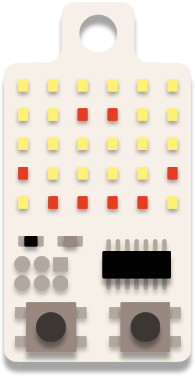
144 real LEDs, two buttons and a coin cell that lasts for months. 17 games are already inside: pick one, play, put it back in your pocket.
And if one day you want to change a game, or write your own, you can. With Arduino.
Only a few pieces of this batch are left. We can't promise a restock: if you've been waiting, now's the time.

Play it here
This is not a video. It's the real KeyChainino 144 firmware, running in your browser: same 17 games, same menu, same two buttons.
Press A and B to choose a game, both together to play. On a computer, the keyboard works too.
Keyboard←Z= A→X= BSpace= A+B
Inside
The first KeyChainino, back in 2015, had one game: a brick breaker. Today there are seventeen, and each one keeps your best score, even when you change the battery.
What it is not
No colors. No sound. No screen. Only 144 red LEDs and two buttons.
I know, it sounds like a limit.
But that's exactly why it works. You take it out while you wait for the bus, you play for two minutes, and you put it back in your pocket. The battery lasts for months because there's nothing else to feed.
And when it sleeps, it really sleeps: it wakes up only when you press A and B together. So it won't turn on by itself in your pocket.
New · Pictures
I made Pictures for my daughter. On the computer there's a big KeyChainino: she taps the lights to draw, presses the rocket, and a second later her drawing lights up on the real one.
A and B flip through the pictures. Both together, and the picture comes alive.
On my KeyChainino
Open source
Everything inside the KeyChainino is on GitHub: the games, the LED driver, the tools. And there's no library to install: every sketch folder has everything it needs.
To upload a sketch you need a programmer. A USBasp costs a few euros. Or you can use an Arduino UNO you already have in a drawer :)
# the 17 games, from the terminal
avrdude -patmega328p -cusbasp -Pusb \
  -U lfuse:w:0xe2:m -U hfuse:w:0xd7:m \
  -U efuse:w:0xff:m \
  -U flash:w:KeyChainino_v144_multigame.hex:i

Where it started
I was waiting for the bus, playing with my keys, and I thought: why can't my keychain do something fun?
In 2015 the first KeyChainino was born: 30 LEDs, an ATtiny84 and one game. Then came the THT kit, to solder yourself, the V3 with 64 LEDs, and now the 144.
The idea hasn't changed since the first day. A tiny thing to play with in the boring moments. And open, so you can make it yours.
Alessandro
Hi Guys, the first KeyChainino, back in 2015, had one game: a brick breaker. Today the KeyChainino 144 has seventeen. And there’s room for one more. Yours 🙂…
Today I want to talk about a particular dog. Not a normal dog, but a special one who doesn’t need a leash. This dog watches you… and it’s…
The KeyChainino arkanoid-like game is based on a ball that bounces on the “screen” (the LED matrix) and a paddle that stops the ball from falling off the bottom of…